Skip to product information
 (4076 Reviews)

πŸ”₯ All-in-One External DVD Drive – Read, Burn, Transfer & Expand Your Laptop Connections

πŸ”₯ All-in-One External DVD Drive – Read, Burn, Transfer & Expand Your Laptop Connections

Regular price $41.99
Regular price $41.99 Sale price
SAVE Liquid error (snippets/price line 119): Computation results in '-Infinity'% Sold out

⏰The first 100 orders per day will receivedouble the product!

BUNDLE & SAVE

πŸ”₯ All-in-One External DVD Drive – Read, Burn, Transfer & Expand Your Laptop Connections

πŸ”₯ All-in-One External DVD Drive – Read, Burn, Transfer & Expand Your Laptop Connections

Regular price $41.99
Regular price $41.99 Sale price
SAVE Liquid error (snippets/price line 119): Computation results in '-Infinity'% Sold out

A CLOSER LOOK

See the Details in Motion

What it does

All-in-one disc, card, and USB expansion

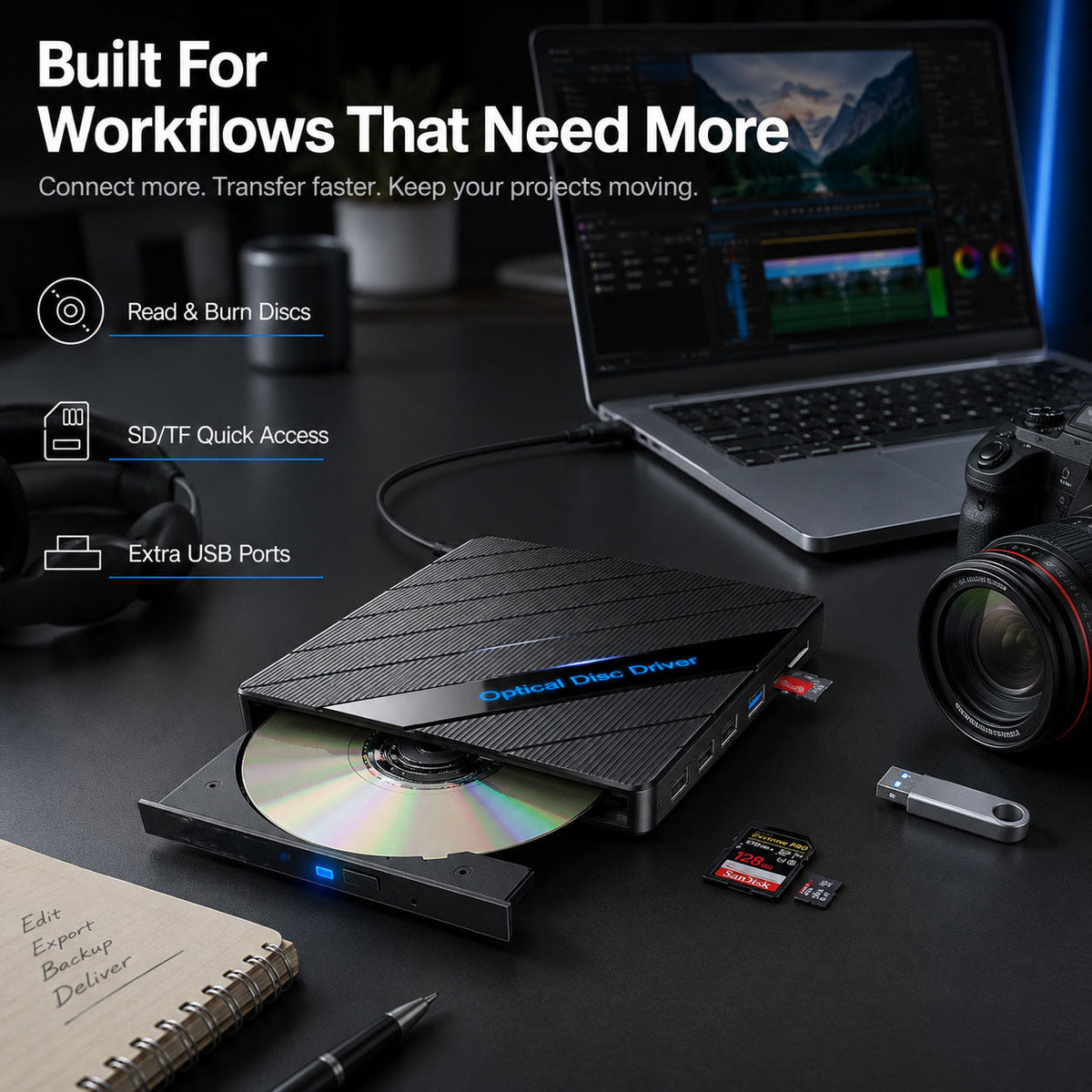
A slim external optical drive that reads and writes CDs and DVDs while also adding SD/TF card access and multiple USB ports β€” a single device to restore missing laptop features.

Disc access

Read & burn CDs/DVDs

Card transfer

SD and TF card slots shown in product images

Extra connections

Multiple USB ports for accessories

External DVD drive connected to a laptop with tray open

Proof in the images

Restore missing laptop functions

Photos in the product set show a clear before/after: laptops without drives regain disc playback and card access when the drive is connected.

Visual evidence

Before/after visuals highlight disc playback and card reading

Before/After split image showing lost drives vs connected drive

How to use

Plug, connect, transfer

Designed for laptop and desktop workflows β€” plug the included cable into a USB/Type‑C port and use the drive for file transfer, media playback, or writing discs.

Quick setup

Plug & play connection

Card access

Use SD/TF slots to move photos and videos

Drive connected to laptop on a desk with SD card and USB drives nearby

Who it's for

Creators, students, families, and professionals

Use it when you need to recover archives, finish a project that requires a disc, or move large photo batches from a camera card β€” the product images show examples of family memories, study, and creative work.

Family using a laptop and external drive to view photos

Family memories

Family video and photo recovery

School & work

Study projects and software discs

SIMPLE SETUP

How It Works

1

Connect

Plug the cable into a USB or Type‑C port on your laptop or desktop.

2

Insert media

Insert a disc or slide an SD/TF card into the side slot shown in product images.

3

Access or burn

Use your computer’s file manager or media player to access files, play discs, or burn data.

Before β†’ After

See what you get back

Before/After β€” shows a laptop without a drive vs. the same laptop with the drive connected, highlighting disc playback, SD card reading, and extra ports.

Laptop without disc drive and loose DVD and SD card (before)
Before β€” no disc drive
External DVD drive connected to laptop with disc tray open and SD card inserted (after)
After β€” disc, card, and extra ports

KEY DETAILS

Product Details

Interface

USB / Type-C connection

Functions

CD/DVD reading and writing

Expansion

USB ports + SD/TF card slots

Compatibility

Laptops and desktop computers (Windows, macOS, Linux stated)

Design

Slim portable body (as shown in images)

Before you choose

Intended device types only

Not designed for TVs, cars, tablets, phones, or Chromebooks β€” intended for laptops and desktop computers. Confirm device compatibility before use.

WHERE IT FITS

Made for Real Routines

Import camera photos

Transfer photos from a camera SD card to your laptop without a separate card reader.

Recover old media

Play or rip CDs/DVDs and access archived family videos stored on discs.

Expand laptop ports

Plug in a flash drive or USB accessory while using the driveβ€”ideal for on-the-go workflows.

GOOD TO KNOW

Questions, Answered

Will this work with my Windows or Mac computer?
Works with most modern Windows, macOS, and Linux laptops and desktops as stated in the product facts.
Do I need to install drivers?
The product description specifies plug & play setup with no complicated driver installation required for typical desktop/laptop setups.
Can I read SD or TF memory cards?
The product description lists SD and TF card access; the product images show SD and microSD (TF) card slots for file transfers.
What are the disc speeds and power requirements?
The product materials do not list power ratings, read/write speeds, or supported disc formats beyond CDs/DVDs, so please check the product packaging or contact the merchant for details before purchase.

Bring your laptop back to full power

Bring discs, cards, and more back into your workflow.

Ready to access old discs, move files from memory cards, or add extra USB ports to your laptop? Choose the configuration above to get an all-in-one external DVD drive that restores DVD/CD access and adds card + USB expansion to your setup.

Choose options above
View full details